Product seller
A product photo includes a room, tabletop, or inconsistent surface that does not match the rest of a catalog.
Isolate the item so it can sit on a consistent store layout or campaign graphic.
Image editing
Remove background distractions from product shots, portraits, and everyday images. Start with a focused image task and hand it off for a polished edit.

Related tools
Background separation is one image task among several. These related routes help when the unwanted element is a person, object, or complete scene.
Know the edges
A clean result depends on what is visible in the source image. These limits are worth checking before you build the cutout into a final design.
Loose strands, fur, translucent fabric, and wispy edges may share similar color or contrast with the original background.
What to do instead
Use a well-lit source with separation around the subject, then inspect the edge at full size before publishing.
Glass, mirrors, glossy packaging, and reflective surfaces can make it unclear which pixels belong to the object and which belong to its surroundings.
What to do instead
Choose a source with a simpler backdrop and review reflective areas closely after the first pass.
Separating a subject does not automatically create a convincing new environment, shadow, perspective, or color treatment.
What to do instead
Place the cutout on a background that matches the subject's light direction and add any final composition work separately.
Small, compressed, or heavily cropped photos provide fewer pixels for distinguishing the subject from nearby shapes.
What to do instead
Begin with the largest clean source available and avoid enlarging the cutout before checking its edges.
How it works
The workflow is short, but each stage matters: identify the subject, review the boundary, and decide where the cutout belongs next.
Choose the photo you want to edit and describe the subject that should remain visible. A clear instruction helps keep the edit focused.
Review the outline around hair, handles, corners, transparent parts, and other areas where the subject meets the original scene.
Place the isolated subject into a product layout, portrait composition, social graphic, or another design only after checking scale and edges.
Visual example
The useful change is not just a blank backdrop. It is the ability to reuse the same subject in a new composition while preserving its recognizable shape.

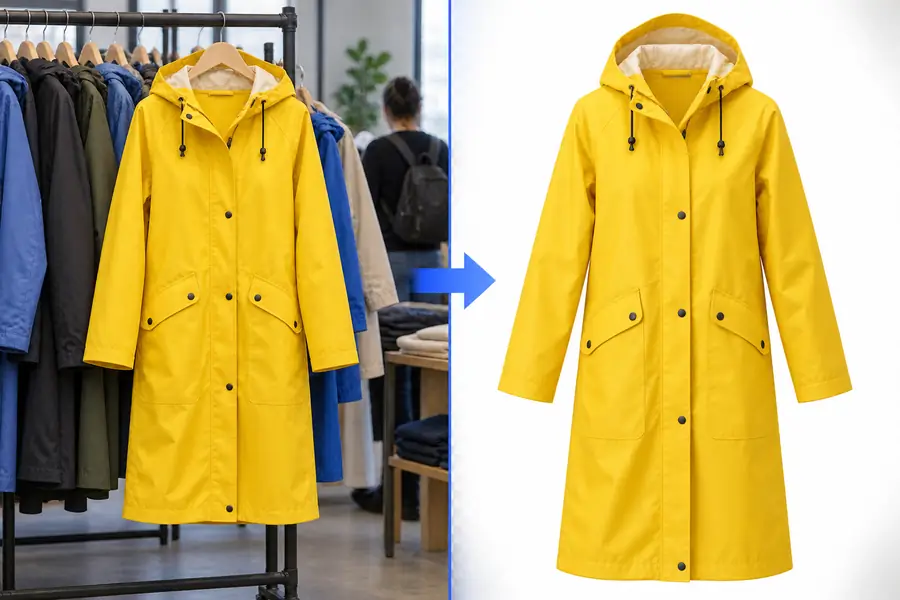
Review edges before placing the cutout in a final design.
Original sceneIsolated subjectUseful applications
Different image tasks need different levels of control. These examples show when background separation is the right first move and when a related removal workflow may fit better.
A product photo includes a room, tabletop, or inconsistent surface that does not match the rest of a catalog.
Isolate the item so it can sit on a consistent store layout or campaign graphic.
A person is well framed, but the original setting competes with a profile image, announcement, or editorial composition.
Keep the person as the visual focus and make the surrounding design easier to control.
A campaign needs the same subject adapted across several colors, layouts, and seasonal backgrounds.
Reuse one isolated image across multiple creative directions without rebuilding the subject each time.
A quick phone photo has a distracting background, but the item itself is clear enough to reuse.
Prepare a more flexible starting asset for a flyer, listing, presentation, or social post.
Ready for the next edit
Start with the image you already have, describe what should remain, and review the result before adding it to your design. A focused removal workflow can save time when the subject is clear and the original scene is getting in the way.
Common questions
It means separating the main subject from the surrounding scene so the subject can be used on its own. The result is useful for placing a person, product, or object into a different layout or visual setting.
Images with a clear subject, good lighting, and visible contrast between the subject and its surroundings usually produce the easiest edges to review. Clean, high-resolution sources are especially helpful around hair, transparent materials, and narrow details.
It can preserve many fine details when they are visible and separated from the original scene, but loose hair, fur, smoke, and translucent fabric are more difficult than solid edges. Always inspect those areas at full size before using the result publicly.
Yes. Once the subject is separated, it can be placed into another design or scene, but the new background still needs to match its scale, lighting, and perspective. Adding a natural shadow or color adjustment may also be necessary.
No. Background removal keeps the selected subject and separates it from the scene, while object removal takes an unwanted item out of an otherwise retained image. Choose an object-focused workflow when the subject should stay integrated with its original background.